Edge Connector
Stop Copying Data Between Systems. Connect Them.
Your cloud quotes are accurate. Your ERP still needs the BoM entered manually. Your CAM operator re-types material specs from a PDF — whether it's a sheet metal part, a tube cutting job, or a profile processing order. Production status lives in a spreadsheet someone updates twice a day.
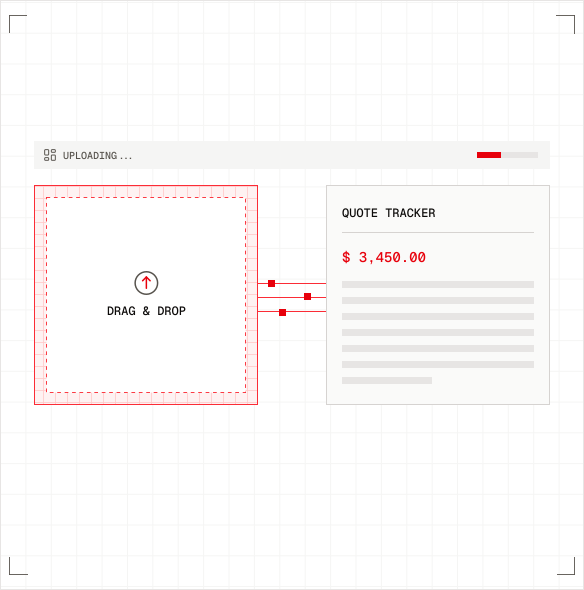
The Edge Connector fixes this. It's a lightweight service that runs on your local server and creates a secure, two-way bridge between Quotation Factory in the cloud and your ERP, CAM, and shop floor systems on-premise. With a built-in Workflow Designer and native MQTT client, it doesn't just move data — it lets you orchestrate your entire integration logic and participate in event-driven architectures like the Unified Namespace.
View on GitHub | Get the Integration Quickstart
What Changes When You Connect
Without the Edge Connector: A quote is approved in Quotation Factory. Someone exports a PDF. Someone else opens the ERP and creates a production order by hand. They re-enter the BoM, the materials, the routing — sheet dimensions, tube lengths, profile specifications. An hour later, there's a typo in the material grade. The wrong tube gets cut. The wrong profile gets ordered.
With the Edge Connector: A quote is approved. The BoM appears in your ERP — every sheet part, every tube, every profile, every machined component. CAD files route to your CAM system — flat parts to the flatbed laser software, tubes to the tube laser software. The production order is created. The customer portal shows "In Production." Nobody touched a keyboard.
That's the difference between a quoting tool and an integrated manufacturing workflow.
How It Works
The Edge Connector is a Windows-based .NET service that runs on your local server. It communicates with the Quotation Factory cloud through Azure IoT technology — encrypted, reliable, and without requiring any inbound firewall rules.
Quotation Factory Cloud
|
Azure IoT (encrypted)
|
Edge Connector (your server)
| | | | |
ERP CAM Custom Workflow MQTT Broker
System System Logic Engine (Unified Namespace)
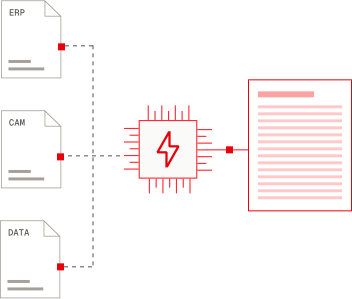
Cloud to Edge. The Edge Connector receives project data, quotation details, and order information from the cloud — then routes each piece to the right on-premise system. Sheet metal BoMs go to your ERP, tube cutting programs route to your tube laser CAM, profile data feeds your sawing line.
Edge to Cloud. It sends back production status updates, manufacturability results, CNC confirmations, and article catalog data — keeping the cloud platform and your customer portal current in real time.
ERP Integration
When a quote is accepted or an order is placed, the Edge Connector pushes everything your ERP needs — automatically.
- Bills of Materials created and updated when RfQs, quotations, or orders are generated — covering sheet parts, tube components, profiles, machined items, and assemblies
- Production routes and working steps synced to your ERP's manufacturing module
- Material usage and production times transferred per operation — flat cutting, tube cutting, sawing, bending, welding, machining, finishing
- Customer and contact data kept in sync between systems
- Article catalogs updated so materials — sheets, tubes, hollow sections, profiles, bars, beams — match across platforms
- Sales orders created with correct pricing and order numbers
- Production status fed back from the shop floor to both the Quotation Factory platform and customer portal
Works with the ERP Systems You Already Run
Ridder iQ | Bemet (PdC) | MKG | ISAH | Lantek Integra | TruTops Fab
Not on the list? Build your own integration with the open-source quickstart (more on that below).
CAM Integration
Before you quote a part, wouldn't it be good to know if your machines can actually make it?
The Edge Connector routes CAD files to your CAM system with the correct quantities and material specs attached — whether it's a sheet metal part heading to your flatbed laser, a tube going to your tube laser, or a profile requiring sawing and drilling. Your CAM software runs a manufacturability check and sends back the results — flagging issues before a price ever reaches the customer.
- Automatic CAD file routing with correct quantities and material specifications — for sheets, tubes, profiles, and machined parts
- Manufacturability validation before quoting — catch issues early, not after the order
- CNC program generation triggered automatically for flat lasers, tube lasers, and machining centers
- Design rule feedback returned to the quoting workflow so problems are visible immediately
Pre-Built for Major CAM Platforms
LVD CADMAN-B | LVD CADMAN-SDI | Trumpf TruTops Boost | Trumpf TruTops Fab | Bystronic BySoft CAM | Autopol | Lantek
Workflow Designer & Engine
Not every integration is a straight line from A to B. Sometimes you need approval steps, conditional routing, retries, or multi-system orchestration. That's where the built-in Workflow Designer and Engine come in.
Design Workflows Visually
The web-based drag-and-drop designer lets integration specialists and operations managers build workflows without writing code. Drag activities onto a canvas, connect them, set conditions — done.
For developers who prefer code, workflows can also be defined programmatically in .NET or declaratively in JSON for version control and portability.
Built for Manufacturing Realities
The Workflow Engine handles what actually happens in a metalworking business:
Processes that take time. Not every workflow completes in milliseconds. Approval chains, multi-day production tracking, and order lifecycle management can run for hours, days, or weeks — the engine picks up right where it left off.
Decisions that depend on context. Route sheet metal BoMs to one ERP endpoint and tube/profile BoMs to another. Hold high-value orders for manager approval. Send assemblies down a different path than single parts. Use C#, JavaScript, or Liquid expressions to evaluate conditions at runtime.
Things that go wrong. ERP sync failed? The workflow retries with backoff. Still failing after three attempts? It escalates to a notification. No more silent failures that nobody notices until a customer calls.
Work that happens on a schedule. Sync your article catalog every night. Pull updated pricing from your ERP every Monday morning. Run address book synchronization on whatever schedule makes sense.
What This Looks Like in Practice
- Conditional ERP routing — Send sheet metal BoMs, tube cutting BoMs, and profile processing BoMs to different endpoints based on customer segment, project type, or material category
- Approval gates — Hold order exports until a manager signs off on quotes above a threshold
- Multi-system orchestration — On order confirmation: create BoM in ERP, send sheet parts to flatbed laser CAM, send tubes to tube laser CAM, notify the shop floor via MQTT, and update the customer portal — as one coordinated flow
- Event-driven chains — When a production status update arrives via MQTT, trigger a workflow that updates the ERP, notifies the customer, and adjusts delivery estimates
MQTT Client & the Unified Namespace
If you're exploring Industry 4.0 concepts — or already running an event-driven architecture — the Edge Connector speaks your language. Its built-in MQTT client publishes and subscribes to topics, making Quotation Factory a first-class participant in your Unified Namespace.
Why This Matters
Traditional factory integration looks like spaghetti: point-to-point connections between every system, each one custom-built and fragile. Break one, and nobody knows until something downstream stops working.
The Unified Namespace flips this. Every system — flat lasers, tube lasers, saws, ERP, MES, SCADA, cloud platforms — publishes events to a shared MQTT topic hierarchy. Any other system that cares about that event subscribes. No brittle connections. No middleware black boxes.
The Edge Connector plugs Quotation Factory into this architecture.
Events That Flow Out
Whenever something happens in Quotation Factory, the Edge Connector can publish it as an MQTT event:
- Quotation events — RfQ received, quote generated, price updated
- Order events — Order confirmed, exported to ERP, order number assigned
- Production events — Status changed, milestone reached, actual times recorded
- Sync events — Articles updated, BoM created, address book synced
- System events — Connector health status, integration errors
Example topic structure:
factory/quotationfactory/rfq/created
factory/quotationfactory/order/confirmed
factory/quotationfactory/production/status-changed
factory/quotationfactory/erp/bom-exported
Events That Flow In
The MQTT client also subscribes to topics from other systems in your environment:
- A flatbed laser publishes "sheet nesting complete" — the Edge Connector updates production status in Quotation Factory
- A tube laser publishes "tube job complete" — the customer portal shows progress in real time
- A sawing line publishes "profiles cut" — production status updates automatically
- Your MES starts a production order — the customer portal shows "In Production" in real time
- An inspection system completes a quality check — results attach to the project automatically
- Inventory levels change in your ERP — material availability for sheets, tubes, and profiles updates across the platform
Workflows + MQTT: The Full Picture
Here's where it gets powerful. MQTT events can trigger workflows, and workflows can publish MQTT events. Combined:
- A tube laser publishes "tube cutting job complete" to the MQTT broker
- The Edge Connector receives the event
- A workflow fires: updates production status in Quotation Factory, checks if all parts in the order — sheets, tubes, profiles, machined components — are done, and — if they are — publishes "order ready for shipping"
- Your logistics system picks up that event and starts the dispatch process
No human in the loop. No delay. No data re-entry.
Bring Your Own Broker — Or Use Ours
- Already have an MQTT broker? Connect to Mosquitto, HiveMQ, EMQX, or any MQTT 3.1.1/5.0 compatible broker
- Don't have one yet? The Edge Connector includes a built-in lightweight MQTT host to get you started
- Not a .NET shop? MQTT is language-agnostic — Python scripts, Node-RED flows, PLC integrations, and custom shop floor applications all work
Wherever You Are on the Journey
Just exploring? Start with the built-in broker. Publish Quotation Factory events and see what becomes possible when your systems can listen to each other.
Already running a UNS? Point the Edge Connector at your existing broker and integrate quoting and ordering data into your established topic hierarchy.
Scaling up? Combine MQTT subscriptions with the Workflow Engine to build reactive automation across your entire factory — from RfQ to shipment.
Build Your Own Integration
The Edge Connector is open source. If you need an integration that doesn't exist yet, you can build it.
The Integration Quickstart repository gives you a working .NET 9 project with example handlers for every message type the Edge Connector supports:
| Message | What It Does |
|---|---|
ReadProjectZipFileAsync | Process project data for ERP export |
RequestAddressBookSyncMessage | Sync customer and contact data |
RequestArticlesSyncMessage | Sync material and article catalogs |
RequestManufacturabilityCheckOfPartTypeMessage | Run manufacturability validation |
RequestProductionTimeEstimationOfPartTypeMessage | Get production time estimates from external systems |
RequestAdditionalCostsOfPartTypeMessage | Calculate additional manufacturing costs |
ProjectStatusChangedMessage | Push production status updates |
ChangeProjectOrderNumberMessage | Update order numbers |
RequestSellingBuyingPartyArticleMessage | Sync selling/buying party article references |
RequestAutoInviteMessage | Trigger automatic collaborator invitations |
The architecture is clean: a File Watcher monitors the Exchange directory, MediatR routes events to your handlers, and typed message contracts (via the MetalHeaven.ExternalDataContracts NuGet package) handle serialization.
Clone it. Modify the handlers. Deploy as a Windows service. Done.
Installation
Setup takes minutes, not days.
1. Download the latest release from the Edge Connector repository.
2. Configure your Integration ID and Exchange directory in AppSettings.json. Generate the Integration ID in the Quotation Factory platform under Settings > Integrations > QF Edge Connector.
3. Install as a Windows service:
sc.exe create QF.Edge.Connector start= auto binpath= "C:\QuotationFactory\EdgeConnector\QF.Agent.Host.exe" displayname= "QF Edge Connector"
4. Set auto-recovery so it restarts if anything goes wrong:
sc.exe failure QF.Edge.Connector reset= 86400 actions= restart/1000/restart/1000/restart/3600
5. Verify by triggering an export from Quotation Factory (change a project status to "Quoted") and checking that files appear in your Exchange output directory.
Security
- Azure IoT encryption on every message between cloud and edge
- Unique device identity per Edge Connector instance — no shared secrets
- On-premise execution — your data stays on your network until explicitly sent to the cloud
- Outbound connections only — no inbound firewall rules required
Open Source, Open Ecosystem
- Edge.Connector — The connector service and releases
- Integration.Quickstart — Template project for building custom integrations
- MetalHeaven.ExternalDataContracts — Typed data contracts on NuGet
Issues, feature requests, and contributions are welcome on GitHub.
Quotes Are Just the Beginning
Quotation Factory generates the quote — for sheet metal parts, tube assemblies, profile constructions, and everything in between. The Edge Connector turns it into a production order, a BoM in your ERP, a CNC program in your CAM system, and a real-time status update on your customer's screen.
Without it, you have a quoting tool. With it, you have an integrated manufacturing workflow.
View on GitHub | Get the Integration Quickstart | Talk to Our Team